The SAS Portal Framework for SAS® Viya® enables you to build your portal to share reports, texts, link list, jobs and more in a structured way. This project builds on top of the SAS® Viya® SDKs and the SAS® Viya® APIs.
Find a video walking you through the setup and the general UI here.
This is what the example portal that is included in this repository looks like:
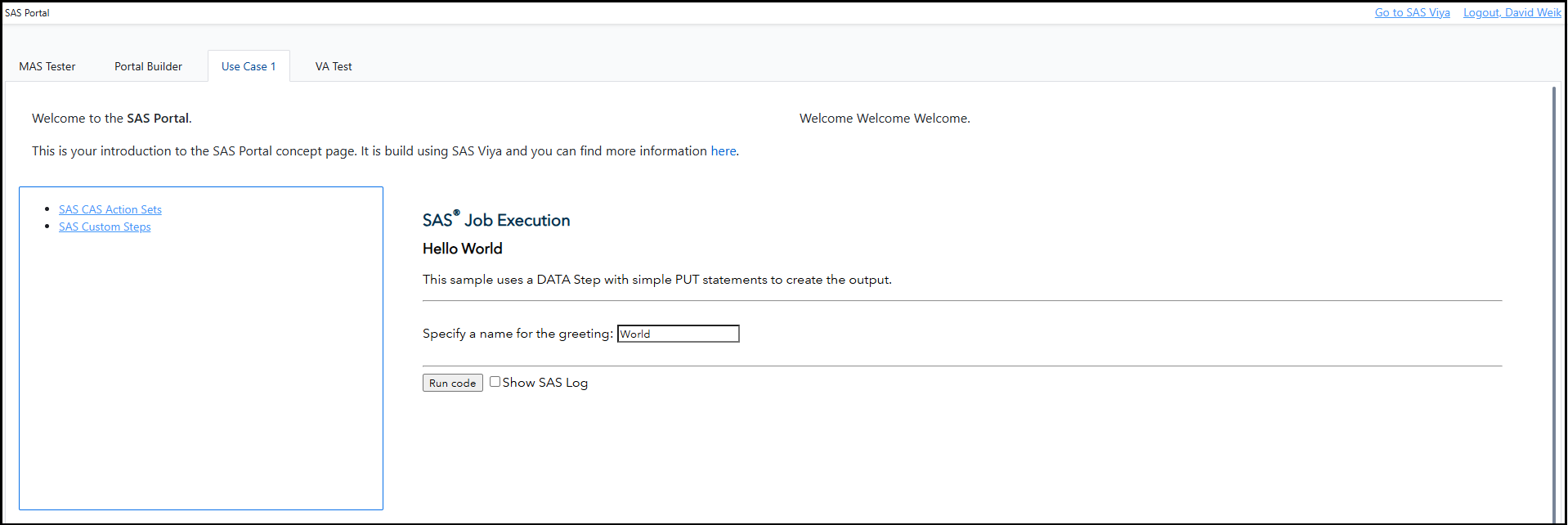
For a better documentation expierence check out the SAS Portal Framework for SAS Viya documentation page.
Ensure that you have followed the setup guides of the SAS Visual Analytics SDK and the SAS Content SDK before proceeding.
If you want to use this SAS Portal as a hybrid solution with SAS 9.4 content, you must remove the option Header set X-Frame-Options SAMEORIGIN from the SAS Webserver configuration. See the SAS documentation.
Changes to the SAS Portal are documented in the CHANGELOG.md.
You will need Node.js (v18 or later) to build the portal from source. This is not required if you deploy a prebuilt release (see below).
Each tagged version publishes a ready-to-deploy sas-portal.zip on the Releases page. Download the latest sas-portal.zip and unzip it onto your web server (see Deploying the Portal) — no Node.js or build step required.
Note: the prebuilt bundle is built with the default
src/config.ts, meaningviyaHostiswindow.location.origin(the portal must be served under the same top-level URL as your SAS Viya host) andportalFolderUripoints at the sample content folder. If your web server runs on a different URL than Viya, or you use your own portal folder, build from source instead so your configuration is baked into the bundle.
- Clone the repository and install dependencies:
git clone https://github.com/sassoftware/sas-portal-framework-for-sas-viya.git
cd sas-portal-framework-for-sas-viya
npm install-
Configure the portal by editing
src/config.ts:- Set
viyaHostto your SAS Viya host URL (only needed if the portal is not hosted under the same URL as the Viya host) - Set
portalFolderUrito the UUID of your portal content folder - Set
portalNameto the name displayed in the portal navbar
- Set
-
Build the portal:
npm run buildThis will type-check, bundle, and create a sas-portal.zip file ready for deployment.
Unzip sas-portal.zip onto your web server. The zip contains all static files needed to run the portal, including the bundled application, CSS, and static assets.
The SAS SDKs (sas-auth-browser, content-components, va-report-components), Bootstrap, and zero-md are loaded via CDN at runtime from within the index.html.
For local development with hot-reload:
npm run devUpdate the proxy targets in vite.config.ts to point to your SAS Viya host for API calls during development.
If you want to use the sample content, then import the Portal-Content-EM.json and Content-EM.json using SAS Environment Manager or the viya-admin CLI.
The examples include also static links to SAS Jobs.
This applies to Use Case 1/interactiveContent-example.json where you will need to replace the URL with your Viya host.
If you replace the file, you will need to update the portal-page-layout.json accordingly with the new file URI.
The VA Test page also requires an additional setup: run the Load-HMEQ.sas file in Content/VA Reports, which will load the hmeq table from sampsio to public.
Edit src/config.ts to configure the portal:
export const config: AppConfig = {
  // SAS Viya host URL - change if your web server is not under the same URL as Viya
  viyaHost: window.location.origin,
  // UUID of the portal content folder in SAS Viya
  portalFolderUri: '68384628-8305-4285-9f16-0cdc57d13dc5',
  // Name displayed in the portal navbar
  portalName: 'SAS Portal',
};
If you imported the sample content you can skip changing the portalFolderUri. If you created your own portal folder, replace the value with the URI of your folder (go to the folder in SAS Environment Manager, select it and copy just the URI ID — everything after /folders/folders/).
The baseline interface comes with native multi language support.
The displayed language is determined by the users browsers language.
Then a file from the languages folder is loaded. The portal comes with English and German support, if you want to add an additional language just copy the public/language/en.json file, rename it to the desired lowercase ISO-639-1 language code and then translate the values of the attributes.
Maintainers are accepting patches and contributions to this project. Please read CONTRIBUTING.md for details about submitting contributions to this project.
Except for the the contents of the /static folder, this project is licensed under the Apache 2.0 License.
Elements in the /static folder are owned by SAS and are not released under an open source license.
This project uses the Bootstrap library, which is under the MIT license. It also uses the Zero-MD library, which is under the ICS license.
SAS and all other SAS Institute Inc. product or service names are registered trademarks or trademarks of SAS Institute Inc. in the USA and other countries.
® indicates USA registration.